

Help With SPSS Data Analysis
Help With SPSS Data Analysis: Elevate Your Research with Our Customized Data Analysis, Methodology, and Results Writing Services. Specializing in SPSS, R, STATA, JASP, Nvivo, and More for Comprehensive Assistance.
Top-Tier Statisticians 👩🔬 | Free Unlimited Revisions 🔄 | NDA-Protected Service 🛡️ | Plagiarism-Free Work 🎓 | On-Time Delivery 🎯 | 24/7 Support 🕒 | Strict Privacy Assured 🔒 | Satisfaction with Every Data Analysis ✅

Our Expertise Recognized by Students at Leading Universities:






Personalised SPSS Data Analysis Help: From Cleaning to Reporting
Statistical data analysis and writing assistance is a comprehensive service tailored to meet the specific needs of your academic research, ensuring that you receive expert support in the following key areas:
- Methodology Writing: We develop a detailed plan for your research approach, outlining the statistical methods to be used in your study. This foundational step ensures that your research is built on a robust methodological framework.
- Data Management: Our services include importing your data into the preferred statistical software, recoding variables to suit analysis requirements, and data cleaning to ensure accuracy and reliability. This process prepares your data for meaningful analysis, setting the stage for insightful findings.
- Data Analysis & Hypothesis Testing: Whether your research requires quantitative data analysis, qualitative data analysis, or a mixed design, our experts are equipped to handle it. We apply appropriate statistical tests for your hypothesis and techniques to analyse your data, uncovering the patterns and insights that support your research objectives.
- Results Writing: We present your findings in a clear and academically rigorous format, adhering to APA, AMA, Harvard, or other academic styles as required. This includes preparing tables and graphs that effectively communicate your results, making them accessible to your intended audience.
Hire a trusted statistician today, and publish with total confidence — Get a Free Quote Now!
How Statistics Support Service Works

1. Submit Your Academic Task
Start by clicking on GET a FREE QUOTE button. Indicate the instructions, the requirements, and the deadline, and upload supporting files for your Academic Task.

2. Make the Payment
Our experts will review and update the quote for your Academic statistical task. Once you agree, make a secure payment via PayPal, which secures a safe transaction

3. Get the Results
Once your academic statistics results is ready, we’ll email you the original solution attachment. You will receive a high-quality result that is 100% plagiarism-free within the promised deadline.
Help With SPSS Data Analysis: The Ultimate Guide for Students and Researchers
SPSS is one of the most popular and powerful software tools for statistical analysis — but for many students and researchers, using it confidently is another story. Whether you’re working on a dissertation, journal submission, or market report, it’s easy to feel lost when faced with a maze of menus, unfamiliar tests, and pages of output.
If you’ve ever asked yourself, “Am I doing this right?” or spent hours second-guessing your results, you’re not alone. Getting help with SPSS data analysis is not only smart — it can mean the difference between flawed findings and a robust, credible report that earns praise and gets published.
This in-depth guide explains exactly what SPSS can do, why getting expert help pays off, and how to get support that matches your project’s goals and deadlines.
✅ Ready to get started? Fill out our form for a Free customised quote, and hire an IBM SPSS expert — stress-free.
Why So Many People Struggle With SPSS
SPSS (Statistical Package for the Social Sciences) is designed to be user-friendly — but behind its menus are powerful statistical engines that still require sound decisions and correct interpretations.
Some of the most common struggles include:
- Importing messy data: Many people trip up trying to bring Excel files into SPSS, only to discover coding errors, wrong variable types, or misaligned cases.
- Choosing the right test: It’s one thing to know how to run a t-test or ANOVA; it’s another to know when each is appropriate.
- Checking assumptions: Many tests rely on conditions like normality or equal variances — ignoring these can produce misleading results.
- Interpreting output: SPSS produces long tables, test statistics, and significance values — but knowing which numbers matter is critical.
- Formatting results: Raw SPSS output rarely meets APA, AMA, or journal-specific style standards.
Trying to master all this under time pressure can be overwhelming. That’s where targeted help comes in.
✅ Ready to get started? Fill out our form for a Free customised quote, and hire an IBM SPSS expert — stress-free.
What Does SPSS Data Analysis Help Include?
Contrary to popular belief, help with SPSS data analysis isn’t just about someone “running numbers for you.” Proper support should be practical, educational, and fully tailored to your research question.
At SPSSanalysis.com, our help typically covers:
Clarifying Your Research Question: We ensure your hypotheses and variables align clearly with the type of analysis you need — whether it’s comparing groups, testing relationships, or predicting outcomes.
- Data Cleaning and Preparation: We check for missing data, outliers, coding errors, or inconsistencies that could skew results.
- Choosing and Running the Right Tests: Our team identifies the best statistical tests based on your data’s type, level of measurement, and assumptions. We run these in SPSS, verifying results step-by-step.
- Interpreting Output: We explain your results in plain English — so you can write your methods and results sections clearly and defend them during your presentation or viva.
- Formatting and Reporting: We provide polished tables and figures in your required style guide — APA, AMA, or your university’s custom requirements.
This means you don’t just submit a neat file — you understand what you did and why, which builds your confidence and impresses your supervisor.
Common Types of SPSS Analyses Students Need Help With
Depending on your discipline and data, you might need:
Descriptive Statistics: Summarize key variables: means, medians, standard deviations, frequency distributions.
Comparing Groups:
- T-tests (one-sample, independent, paired)
- ANOVA (one-way, repeated measures, factorial designs)
Testing Relationships:
Non-Parametric Tests:
Reliability and Scale Analysis:
- Cronbach’s alpha for internal consistency
- Factor analysis to reduce variables
Biostatistical Test:
More Advanced Statistics:
Each comes with assumptions that must be checked and reported correctly — a detail many students overlook.
Why Assumptions Matter in SPSS
Many students lose marks because they run tests without verifying that their data meet required assumptions. For example:
- A t-test assumes normal distribution of the dependent variable.
- ANOVA assumes homogeneity of variances.
- Regression assumes linearity and independence of errors.
Ignoring these can invalidate your conclusions. Our statisticians test these assumptions using tools like Shapiro-Wilk, Levene’s test, or residual plots, and recommend robust alternatives when needed.

How to Handle Missing Data and Outliers in SPSS
No dataset is perfect. Proper help ensures you handle imperfections responsibly.
In SPSS, we can:
- Diagnose patterns of missingness (MCAR, MAR, MNAR)
- Decide whether to impute, exclude, or transform data
- Use techniques like mean substitution, multiple imputation, or pairwise deletion
- Detect outliers and check their impact through sensitivity analyses
Documenting how you treated these issues reassures examiners that your findings are honest and thorough.
How to Present SPSS Results Like a Pro
One big reason supervisors or journal editors reject reports? Messy tables copied directly from SPSS’s raw output.
Good reporting includes:
- Clean, concise tables with meaningful titles.
- Consistent rounding (usually two or three decimal places).
- Clear indication of test statistic values, degrees of freedom, p-values, effect sizes, and confidence intervals.
- Figures like bar charts or scatterplots where appropriate — not cluttered pie charts.
We prepare ready-to-paste tables and figures that meet your style guide, saving you hours of frustrating formatting.
How Long Does SPSS Help Take?
Time depends on the complexity of your data and your deadlines. Many students reach out in a panic just days before submission — we help them too, but ideally, plan ahead!
At SPSSanalysis.com, typical turnaround for standard analyses is 3–5 days. More advanced projects (multivariate analyses, large datasets) may take a week or so. Rush support is available for tight deadlines — just tell us when you request your free quote.
Who Uses Our SPSS Help?
We assist:
- Undergraduate and graduate students preparing theses and dissertations.
- Academic researchers drafting journal articles.
- Healthcare professionals analyzing survey or clinical data.
- Business analysts needing clear statistical reports for stakeholders.
No matter your level of expertise, our role stays the same: take the stress out of your data so you can focus on your conclusions.
Why Choose SPSSanalysis.com for SPSS Support?
Here’s what sets us apart:
- Proven Expertise: Our statisticians hold advanced degrees and have run thousands of SPSS projects across psychology, nursing, education, public health, and more.
- Personalized Service: We don’t hand you generic output. We tailor our advice to your exact research aim and explain it in clear, simple language.
- Confidential and Secure: Your data stays private. We work under strict confidentiality agreements and never share your files with third parties.
- Transparent Pricing: No hidden costs. You receive a clear quote upfront and pay only for what you need.
- Fast and Flexible: From quick checks to full reports, we adapt to your deadlines — even if it’s urgent.
✅ Ready to get started? Fill out our form for a Free customised quote, and hire an IBM SPSS expert — stress-free.
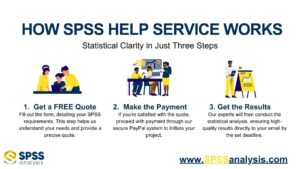
How to Get Started: Step-by-Step
Getting help with SPSS doesn’t have to be complicated.
- Request a Free Quote: Fill out the short form with your research question, dataset (if you have one), and your deadline.
- Get a Custom Plan: Within 24 hours, we’ll send you a clear plan, timeline, and cost estimate.
- Approve and Pay Securely: Once you approve, we get started immediately.
- Receive Expert Analysis: We clean your data, run your tests, check assumptions, and prepare polished output.
- Get Clear Explanations: Along with your results, we explain exactly what they mean, so you can write with confidence.
Final Thoughts: Focus on Insights, Not Software Stress
SPSS is a reliable, versatile tool — but even the best software can’t replace sound statistical judgment. Getting professional help means fewer mistakes, clearer writing, and more confidence when answering your supervisor’s questions.
Stop second-guessing your analysis and free up time to focus on what matters: interpreting your findings and discussing what they mean.
Ready to get stress-free, expert-level support? Request your free quote now and see how easy and reassuring SPSS data analysis can be with the right team behind you.
Stay connected with SPSSanalysis.com on LinkedIn for the latest updates and insights!