

Moderation Analysis with Hayes PROCESS Macro
Discover Moderation Analysis with Hayes PROCESS Macro! Learn how to perform, understand SPSS output, and report results in APA style. Check out this simple, easy-to-follow guide below for a quick read!
Struggling with Moderation Analysis in SPSS? We’re here to help. We offer comprehensive assistance to students, covering assignments, dissertations, research, and more. Request Quote Now!

Introduction
Moderation analysis plays a pivotal role in understanding how the relationship between an independent variable and a dependent variable changes across different levels of a third variable, known as the moderator. This type of analysis is invaluable in fields such as psychology, social sciences, and behavioural research. It allows researchers to explore conditional relationships, providing insights into how certain effects may vary under different circumstances. For instance, the effect of stress on performance may differ based on the level of social support an individual receives.
The Hayes PROCESS Macro for SPSS simplifies the moderation analysis process, making it accessible even for those with limited statistical expertise. This powerful tool automates the complex calculations involved, reducing the likelihood of errors and saving valuable time. By mastering the Hayes PROCESS Macro, researchers can conduct sophisticated moderation analyses with ease, ensuring their findings are both robust and reliable. This blog post will guide you through the fundamentals of performing moderation analysis using Hayes PROCESS, from understanding the concept to interpreting the output.
PS: This post explains the Hayes PROCESS Macro method in SPSS for moderation analysis. If you prefer to use traditional regression, please visit our guide on “Moderation Analysis using Regression Method in SPSS.”
What is Moderation Analysis?
Moderation analysis examines how the relationship between an independent variable (X) and a dependent variable (Y) changes as a function of a third variable, called the moderator (M). The moderator can either strengthen, weaken, or reverse the effect of the independent variable on the dependent variable. By including a moderator, researchers can capture more nuanced relationships and better understand the conditions under which certain effects are stronger or weaker.

This type of analysis is particularly useful in social sciences, where the impact of one variable on another often depends on additional contextual factors. For instance, the effect of stress on performance might vary depending on levels of social support. This helps researchers identify these cofounding effects, providing deeper insights into the dynamics of the studied relationships.
What are Steps in Testing Moderation?
- Center the Moderator and Independent Variable: Mean-center the independent variable and the moderator to reduce multicollinearity and simplify the interpretation of the interaction term.
- Create Interaction Term: Multiply the centered independent variable and the centered moderator to create an interaction term.
- Run Regression Analysis: Enter the independent variable, moderator, and interaction term into a multiple regression model predicting the dependent variable.
- Plot Interaction: Plot the interaction to visualise how the relationship between the independent variable and the dependent variable changes at different levels of the moderator.
What is Hayes PROCESS Macro?
Hayes PROCESS Macro is a widely-used statistical tool designed to facilitate mediation, moderation, and conditional process analysis. Developed by Andrew F. Hayes, this macro integrates seamlessly with SPSS, providing an accessible interface for performing complex statistical analyses. The macro’s popularity stems from its ability to automate intricate calculations, reducing the risk of errors and saving valuable time for researchers.
The Hayes PROCESS Macro supports a variety of models, allowing researchers to explore direct, indirect, and conditional effects within their data. By offering bootstrap confidence intervals for indirect effects, the macro ensures more accurate and reliable results. This feature is particularly valuable in mediation analysis, where understanding the significance of indirect effects is crucial. Overall, Hayes PROCESS Macro enhances the analytical capabilities of SPSS, making advanced statistical techniques more accessible.
How to Install Hayes PROCESS Macro in SPSS?
Firstly, download the Hayes PROCESS Macro from the official website. Ensure that you select the correct version compatible with your SPSS software. Once downloaded, locate the file, which typically comes in a .zip format, and extract its contents to a designated folder on your computer.
Next, open SPSS and navigate to the syntax editor by clicking `File > New > Syntax`. In the syntax editor, type the following command: `INSTALL FILE=’C:\path\to\processmacro.sps‘`. Replace `C:\path\to\processmacro.sps` with the actual path to the extracted .sps file. Run the command by highlighting it and pressing the green play button. After installation, the PROCESS Macro will be available under the `Analyze > Regression` menu.
Which is the Method better: Using Hayes PROCESS Macro or Traditional Regression for Moderation Analysis?
Choosing between Hayes PROCESS Macro and traditional regression for moderation analysis depends on your research needs and statistical expertise. The Hayes PROCESS Macro offers a user-friendly interface, automating many steps of the moderation analysis and providing bootstrap confidence intervals for the interaction effects. This method reduces human error and enhances result reliability, making it a preferred choice for those who seek convenience and precision.
In contrast, traditional regression requires manual computation of interaction terms and more steps in the analysis process. While it offers flexibility and a deeper understanding of the moderation process, it demands a higher level of statistical knowledge. The regression might be better suited for researchers who prefer customising their analyses and exploring the underlying data in more detail. Both methods have their advantages, and the choice ultimately depends on the research context and the user’s familiarity with statistical tools.
What are the Assumptions of Moderation Analysis?
- Linearity: The relationships between the independent variable, moderator, and dependent variable must be linear.
- Independence of Errors: The error terms in the regression equations should be independent of each other.
- No Multicollinearity: The independent variable, moderator, and their interaction term should not be highly correlated with each other.
- Homoscedasticity: The variance of the error terms should be constant across all levels of the independent variable and the moderator.
- Normality: The residuals of the regression equations should be normally distributed.
- Measurement without Error: The variables involved in the moderation analysis should be measured accurately without error.
What is the Hypothesis of Moderation Analysis?
The primary hypothesis in moderation analysis posits that the strength or direction of the relationship between an independent variable (X) and a dependent variable (Y) depends on the level of a third variable, the moderator (M).
- H0 (The null hypothesis): The interaction term does not significantly predict the dependent variable (meaning there is no moderation effect.)
- H1 (The alternative hypothesis): the interaction term significantly predicts the dependent variable. (indicating the presence of a moderation effect.)
Testing these hypotheses involves examining the interaction term in the regression model to determine if the moderation effect is statistically significant.
An Example of Moderation Analysis
Consider a study examining the impact of work stress (X) on job performance (Y) and how this relationship is moderated by social support (M). The hypothesis posits that the negative effect of work stress on job performance will be weaker for employees with high social support compared to those with low social support. To test this, researchers would first mean-center the variables of work stress and social support.
Next, researchers would create an interaction term by multiplying the centered work stress and social support variables. By entering work stress, social support, and the interaction term into a regression model predicting job performance, researchers can assess the main effects and the interaction effect. If the interaction term is significant, it indicates that social support moderates the relationship between work stress and job performance.


Step by Step: Running Moderation Analysis in SPSS Statistics
Let’s embark on a step-by-step guide on performing the Moderation Analysis using SPSS
-
Prepare Your Dataset:
– Ensure your dataset is loaded in SPSS and includes the independent variable (X), dependent variable (Y), and moderator (M).
-
Open Hayes PROCESS Macro:
– Navigate to `Analyze > Regression > PROCESS vX.X` in SPSS. This will open the Hayes PROCESS Macro dialogue box.
-
Specify Variables:
– In the PROCESS dialogue box, enter your independent variable (X) in the `Independent Variable` field.
– Enter your dependent variable (Y) in the `Dependent Variable` field.
– Enter your moderator (M) in the `Moderator Variable` field.
-
Select Model Type:
– Choose Model 1 from the drop-down menu, as it corresponds to simple moderation analysis.
-
Adjust Bootstrap Samples:
– Set the number of bootstrap samples to 5000. This provides more precise confidence intervals for the interaction effect.
-
Configure Output Options:
– Ensure that the options for `Generate Total Effect Model` and `Generate Direct and Indirect Effect Model` are selected. These options will give you comprehensive output, including all relevant effects.
-
Run the Analysis:
– Click the OK button to run the moderation analysis. SPSS will process the data and generate output tables detailing the interaction effect, main effects, and their significance levels.
By following these steps, you can effectively perform moderation analysis using the Hayes PROCESS Macro in SPSS, ensuring accurate and reliable results.
Note: Conducting Moderation Analysis in SPSS provides a robust foundation for understanding the key features of your data. Always ensure that you consult the documentation corresponding to your SPSS version, as steps might slightly differ based on the software version in use. This guide is tailored for SPSS version 25, and for any variations, it’s recommended to refer to the software’s documentation for accurate and updated instructions.
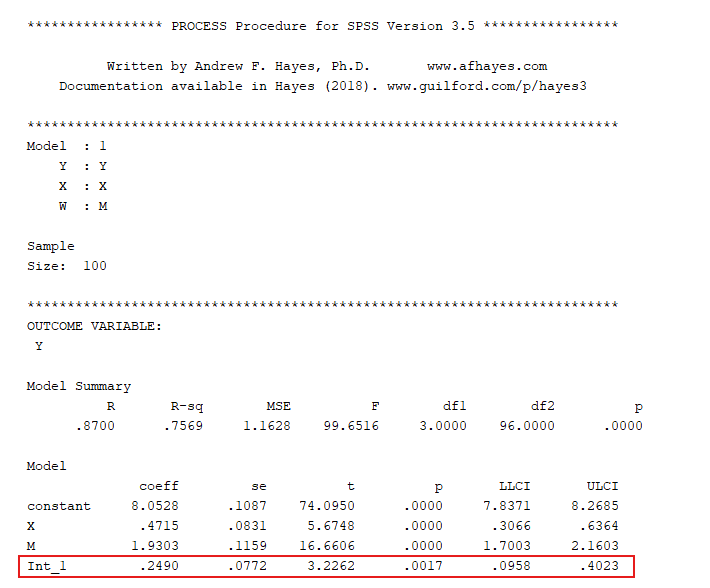
SPSS Output for Moderation Analysis


How to Interpret SPSS Output of Moderation Analysis
When interpreting the SPSS output of your moderation analysis, focus on three key tables: Model Summary, ANOVA, and Coefficients.
-
Model Summary Table:
- R: This represents the correlation between the observed and predicted values of the dependent variable. Higher values indicate a stronger relationship.
- R Square (R²): This value indicates the proportion of variance in the dependent variable explained by the independent, moderator, and interaction variables. An R² value closer to 1 suggests a better fit.
- Adjusted R Square: Adjusts the R² value for the number of predictors in the model. This value is useful for comparing models with different numbers of predictors.
-
ANOVA Table:
- F-Statistic: This tests the overall significance of the model. A significant F-value (p < 0.05) indicates that the model significantly predicts the dependent variable.
- (p-value): If the p-value is less than 0.05, the model is considered statistically significant, meaning the independent and mediator variables together significantly predict the dependent variable.
-
Coefficients Table:
- Unstandardized Coefficients (B): Coefficient of variable
- Constant (Intercept): The expected value of the dependent variable when all predictors are zero.
- Standardized Coefficients (Beta): These coefficients are useful for comparing the relative strength of each predictor in the model.
- t-Statistic and Sig. (p-value): Indicates whether each predictor is significantly contributing to the model. If the p-value is less than 0.05, the predictor is considered statistically significant.
By focusing on these tables, you can effectively interpret the results of your mediation analysis in SPSS, identifying the direct and indirect effects, as well as the overall model significance.
How to Report Results of Moderation Analysis in APA
Reporting the results of moderation analysis in APA (American Psychological Association) format requires a structured presentation. Here’s a step-by-step guide in list format:
- Introduction: Briefly describe the purpose of the moderation analysis and the variables involved.
- Descriptive Statistics: Report the means and standard deviations of the independent variable, moderator, and dependent variable.
- Main Effects: Provide the regression coefficients, standard errors, and p-values for the independent variable and moderator.
- Interaction Effect: Report the regression coefficient, standard error, and p-value for the interaction term.
- Model Summary: Include R² and adjusted R² values to indicate the model fit.
- Significance Tests: Present the results of the F-test and the significance levels for the overall model.
- Plot Interaction: Include a plot illustrating the interaction effect, showing how the relationship between the independent variable and the dependent variable changes at different levels of the moderator.
- Figures and Tables: Provide tables and figures to visually represent the statistical results and interaction effects.
- Conclusion: Summarise the key results and suggest directions for future research.

Get Help For Your SPSS Analysis
Embark on a seamless research journey with SPSSAnalysis.com, where our dedicated team provides expert data analysis assistance for students, academicians, and individuals. We ensure your research is elevated with precision. Explore our pages;
- SPSS Help by Subjects Area: Psychology, Sociology, Nursing, Education, Medical, Healthcare, Epidemiology, Marketing
- Dissertation Methodology Help
- Dissertation Data Analysis Help
- Dissertation Results Help
- Pay Someone to Do My Data Analysis
- Hire a Statistician for Dissertation
- Statistics Help for DNP Dissertation
- Pay Someone to Do My Dissertation Statistics
Connect with us at SPSSAnalysis.com to empower your research endeavors and achieve impactful data analysis results. Get a FREE Quote Today!