

Median Imputation for Missing Data in SPSS
Discover Median Imputation for Missing Data in SPSS! Learn how to perform, understand SPSS output, and report results in APA style. Check out this simple, easy-to-follow guide below for a quick read!
Struggling with Replacing Missing Values in SPSS! We’re here to help. We provide comprehensive support to academics and PhD students, encompassing assignments, dissertations, research, and additional services. Request Quote Now!
1. Introduction
When working with real-world data, missing values are almost inevitable. Left untreated, they can reduce the accuracy and validity of statistical analyses. One of the simplest and most robust methods for dealing with missing data—particularly for skewed or non-normally distributed variables—is median imputation. This blog explains what median imputation is, when it’s appropriate, and how to perform and report it using SPSS.
2. What is Missing Data?
Missing data refers to the absence of information for one or more variables in a dataset. It can occur randomly or follow patterns, and it can be classified into three categories:
-
MCAR (Missing Completely at Random): The probability of missingness is unrelated to any observed or unobserved data.
-
MAR (Missing at Random): Missingness depends on other observed variables.
-
MNAR (Missing Not at Random): Missingness depends on the value itself or unobserved data.
Understanding the type of missingness is crucial for selecting an appropriate imputation strategy.
3. How to Handle Missing Data in SPSS
SPSS offers a variety of tools to address missing data, grouped into two main categories: single imputation and multiple imputation. Choosing the right approach depends on the amount of missingness, the underlying missing data mechanism (MCAR, MAR, MNAR), and the analysis goals.
I. Single Imputation Methods (via “Replace Missing Values” in SPSS)
These techniques substitute each missing value with a single estimate based on existing data:
-
Series Mean: Replaces all missing values in a variable with the overall mean of that variable. Best for normally distributed variables with low missingness.
-
Mean of Nearby Points: Uses the mean of adjacent (neighboring) values, which can be useful for time-series or ordered data.
-
Median of Nearby Points: Similar to the above, but uses the median instead of the mean, making it more robust to outliers.
-
Linear Interpolation: Fills in missing values using a straight line between two known data points. Works well when values are missing in the middle of a sequence.
-
Linear Trend at Point: Applies a linear regression model to predict the missing value at a specific point based on the trend of the variable across time or order.
These methods are quick and easy to implement, but they do not reflect uncertainty, and may bias standard errors or reduce variability in your dataset.
II. Multiple Imputation Methods (via “Multiple Imputation” in SPSS)
Unlike single imputation, multiple imputation creates several different plausible values for each missing data point, generating multiple complete datasets. The results from these datasets are then pooled for final analysis, allowing better estimation of uncertainty due to missing data. SPSS uses the MCMC and FCS (Fully Conditional Specification) frameworks to perform multiple imputation.
Here are the common methods:
-
FCS / MICE (Multiple Imputation by Chained Equations): This is the default in SPSS. Each variable with missing data is imputed conditionally based on a regression model using the other variables. This is flexible and supports both continuous and categorical data.
Best when data are Missing at Random (MAR) and the relationships among variables are important to preserve.
-
Predictive Mean Matching (PMM): A variation of regression imputation that ensures the imputed value is a realistic value from the observed dataset. It selects an observed value from cases with similar predicted values.
Useful when you want to avoid unrealistic or out-of-range imputed values.
-
Bayesian Estimation: Introduces randomness by sampling from a posterior distribution of parameters. This allows the imputations to reflect both model uncertainty and missingness.
Suitable for advanced users working under MAR assumptions or when modeling uncertainty is critical.
Multiple imputation is recommended when:
-
More than 5–10% of the data are missing
-
You assume data are MAR
-
You need valid inferences for regression, hypothesis testing, or model building
While more computationally intensive, multiple imputation provides more accurate standard errors and better preserves data relationships compared to single imputation.
4. Why Handling Missing Values Is Important in Statistical Analysis?
Failing to address missing data properly can lead to:
-
Biased estimates: If missingness is not random, ignoring it can distort your results.
-
Reduced statistical power: Loss of data means less information, resulting in wider confidence intervals and weaker significance.
-
Invalid assumptions: Many statistical models assume complete data. Violating this can compromise model validity.
By handling missing data thoughtfully—starting with an appropriate imputation strategy—you can ensure more reliable and interpretable results.
5. What is the Imputation Median for Missing Data in SPSS?
Median imputation is a single imputation technique that replaces missing values in a variable with the median of the observed values. Unlike mean imputation, which can be sensitive to extreme values (outliers), the median is more resistant to skewness and provides a better central estimate when the distribution is non-normal.
For example, if a variable contains values like 20, 25, 25, 26, 30, 90, the mean is distorted by the 90, but the median (25.5) gives a better central tendency. This makes median imputation a safer choice for ordinal variables or numeric variables with skewed distributions.
6. What Are the Assumptions of Median Imputation?
Before applying median imputation, it is essential to understand the conditions under which this method is most appropriate:
-
Missing Completely at Random (MCAR) or Missing at Random (MAR): Median imputation is generally acceptable if missingness does not depend on unobserved values.
-
Non-normal or skewed data: Median imputation is more robust than mean imputation in distributions affected by outliers.
-
Low to moderate missingness: This method is best applied when the percentage of missing data per variable is relatively low (e.g., <10%).
Keep in mind that, like all single imputation methods, median imputation does not reflect uncertainty and can underestimate variability.
7. An Example for Median Imputation
Consider a dataset of 300 participants where the variable Income has 5% missing values. The distribution of observed income values is positively skewed due to a small number of participants with exceptionally high earnings. While the mean income is around $50,00, the median of the observed values is $48,422, which better represents the typical income level for this sample.
To avoid the influence of extreme high incomes, median imputation is applied. All missing income values are replaced with the median value of $48,400. This preserves the sample size while offering a more robust central estimate, particularly important in skewed financial data where the mean may not accurately reflect the typical participant’s income.



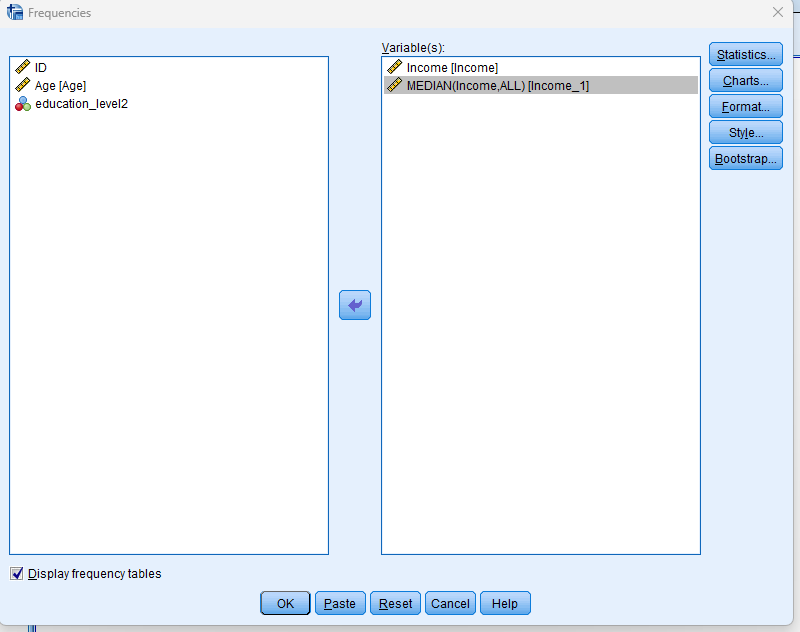
Step by Step: Running Median Imputation in SPSS Statistics
Let’s embark on a step-by-step guide on performing the Replacement of Missing Values using SPSS
To apply mean imputation using SPSS:
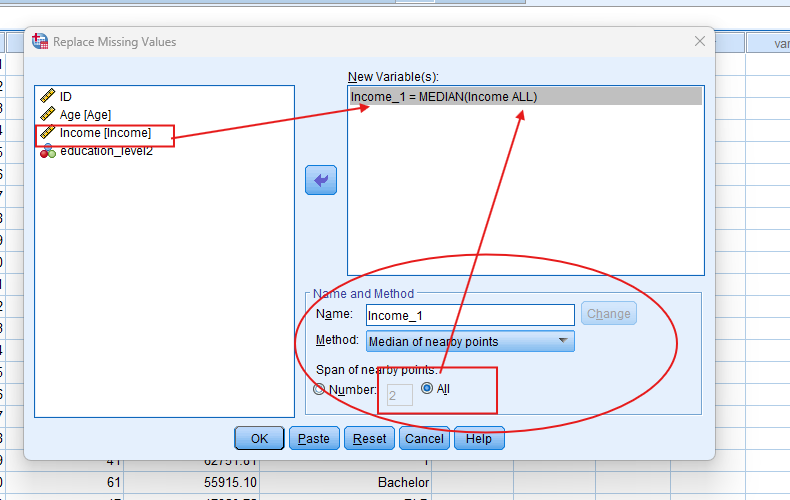
1. Step: Go to Transform → Replace Missing Values.
2. Step: Select the variable with missing data (e.g., Income).
3. Step: Under “Method,” choose Median of Nearby Point.
4. Step: Click OK. SPSS will create a new variable (e.g., Income_1) with missing values replaced by the median.
Alternative using Syntax (to replace with exact median):
FREQUENCIES VARIABLES=income
/STATISTICS=MEDIAN.
Use the output to identify the median value, then:
COMPUTE income_1 = Income.
IF MISSING(Income) income_1 = 48422.
EXECUTE.
Note: Conducting Replacing Missing Values in SPSS provides a robust foundation for understanding the key features of your data. Always ensure that you consult the documentation corresponding to your SPSS version, as steps might slightly differ based on the software version in use.
This guide is tailored for SPSS version 25, and for any variations, it’s recommended to refer to the software’s documentation for accurate and updated instructions.
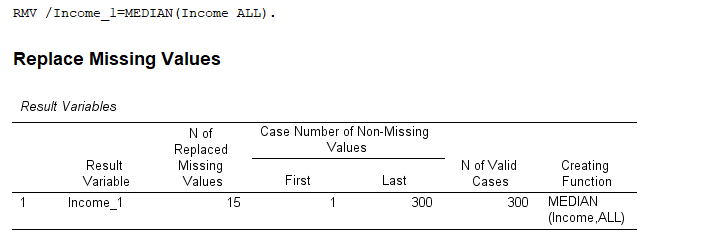
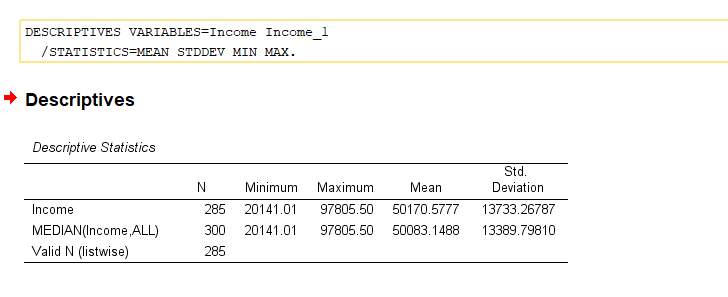
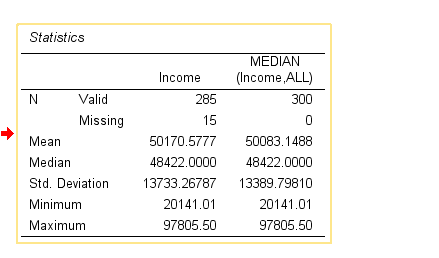
9. SPSS Output for Replacing Missing Values with the Median
10. How to Interpret SPSS Output for Median Imputation
SPSS does not produce an analytical output for the imputation itself. However, you can verify the results using the following:
-
Descriptive Statistics (Analyze → Descriptive Statistics → Descriptives) to confirm that missing values have been filled and the new variable is complete.
-
Compare distributions (histogram, boxplot) of the original and imputed variables to check for any artificial shifts in central tendency or spread.
-
Check missing value counts using Frequencies or Variable View — your imputed variable should have no missing values.
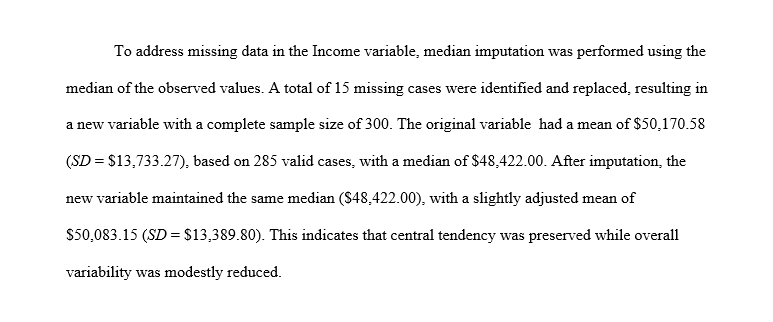
11. How to Report Median Imputation Results
When reporting median imputation in your thesis, article, or technical report, it’s important to be transparent. Here’s how to do it effectively:
-
State the proportion of missing data and the variable(s) affected.
-
Mention the imputation method and rationale (e.g., non-normal distribution, presence of outliers).
-
Indicate the software and version used.
-
Provide the median value used for imputation.
-
Note limitations, such as reduced variance or inability to model uncertainty.
Get Help For Your SPSS Analysis
Embark on a seamless research journey with SPSSAnalysis.com, where our dedicated team provides expert data analysis assistance for students, academicians, and individuals. We ensure your research is elevated with precision. Explore our pages;
- SPSS Help by Subjects Area: Psychology, Sociology, Nursing, Education, Medical, Healthcare, Epidemiology, Marketing
- Dissertation Methodology Help
- Dissertation Data Analysis Help
- Dissertation Results Help
- Pay Someone to Do My Data Analysis
- Hire a Statistician for Dissertation
- Statistics Help for DNP Dissertation
- Pay Someone to Do My Dissertation Statistics
Connect with us at SPSSAnalysis.com to empower your research endeavors and achieve impactful data analysis results. Get a FREE Quote Today!